🚀 Welcome to CDR Premium
CDR Premium is the first Telegram bot with x402 protocol integration for AI agent payments. Track pump.fun token launches in real-time and let AI algorithms detect high-growth opportunities—whether you're a human trader or an autonomous AI agent.
- 🤖 AI Agent-Native: First bot with x402 payment protocol—AI agents can autonomously purchase trading signals
- ⚡ Real-Time Intelligence: Monitors 400+ tokens every 4 seconds with 10 simultaneous algorithms
- 💎 Instant Alerts: Get signals the moment patterns emerge, not 15 minutes later
- 🔗 Blockchain Payments: Pay-per-signal with SOL ($1/signal)—no subscriptions, no API keys
- 📊 Full Transparency: Every signal includes 27 metadata fields for backtesting and analysis
🌐 Built for the AI Economy
CDR Premium leverages x402 protocol—an open standard for internet-native payments built on HTTP 402 status codes. This means:
- AI agents can trade autonomously without human intervention
- Pay only for what you use - $1 per signal, no monthly fees
- Instant settlement - payments verified on Solana in 2 seconds
- No middlemen - revenue goes directly to the protocol via revenue share wallet
Join CDR Premium
🤖 Start Bot (Humans) 🔗 API Access (AI Agents) 📡 Discovery Channel 💬 Community Group 🐦 TwitterQuick Start
📚 Getting Started Guide (Telegram Bot) 🤖 API Integration (AI Agents)🚀 Getting Started
Step 1: Start the Bot
Open the CDR Premium bot on Telegram and send:
/start
This activates your account and enables signal delivery
Step 2: Check Your Access Level
/subscribe
View your current subscription tier and benefits
Step 3: Customize Algorithms (Premium)
/algos
Enable/disable the 10 built-in AI algorithms to control which signals you receive
/myalgos
CDR Holders: Create your own custom algorithms with 44 filters (Simple, Advanced, Professional tiers)
/marketplace
Browse and subscribe to custom algorithms built by other traders. Sellers earn 75% of each sale.
/help anytime to see all available commands
Free vs Premium
| Feature | Free | Premium |
|---|---|---|
| Signal Delivery Speed | 15 minute delay | Instant (<500ms) |
| Algorithm Selection | All algorithms (random) | Custom selection |
| AI Tools | Limited | Unlimited |
| Analytics Dashboard | ✅ Full access | ✅ Full access |
| Custom Algos (/myalgos) | ❌ Not available | ✅ CDR Holders (44 filters) |
| Algo Marketplace | Browse only | ✅ Buy & sell algos |
🔍 How CDR Premium Works
The Detection Pipeline
CDR Premium operates in a continuous monitoring cycle:
- API Polling: Fetches 400 newest tokens from pump.fun every 4 seconds
- Viewer Tracking: Records viewer count changes for all tokens
- Pattern Detection: 10 algorithms analyze viewer patterns simultaneously
- Signal Generation: When a pattern matches, creates a signal with confidence score
- Alert Delivery: Sends formatted alert to Telegram (instant for Premium, 15min delay for Free)
Token Age Filter
Cooldown System
To prevent spam and maintain quality:
- Per Algorithm: Same algorithm won't call the same token twice within 2 hours
- Per Token: You won't receive alerts for the same token more than once per 24 hours
Minimum Requirements
Tokens must meet these criteria to trigger signals:
- Minimum 20 concurrent viewers
- Less than 2 hours old
- Algorithm-specific pattern thresholds
⚡ Instant Signals
Signal Format
Every signal includes:
- Token Name & Ticker: Identification
- Algorithm Name: Which AI detected this pattern
- Confidence Score: Algorithm's confidence level (Medium/High/Very High)
- Entry Market Cap: Current market cap when signal was generated
- Viewer Data: Current viewers and pattern details
- Reason: Why the algorithm triggered
- Quick Actions: PNL tracker and AI scan buttons
Acting on Signals
Interactive Buttons
Every signal includes action buttons:
- 📊 Track PNL: Opens live profit tracker for this token
- 🤖 AI Scan: Generates deep AI analysis report
📊 Analytics Dashboard
CDR provides comprehensive performance tracking commands:
Real-Time Stats
/stats
Live 24-hour performance overview with interactive navigation
- Total signals sent
- Win rate (tokens that hit 2x)
- Average max gain
- Top performers
- Algorithm breakdown
Time-Based Reports
/last24h
Complete scorecard for the last 24 hours
/last12h
Recent 12-hour performance window
/last7d
Full 7-day track record with detailed breakdown
Leaderboards
/report
Algorithm leaderboard showing which AI strategies are performing best
/top
Top 10 biggest gainers across all signals
Performance Analysis
/roi
ROI calculator: "What if I bought every signal?" analysis
/speed
Fastest mooners - tokens that reached 5x+ in under 10 minutes
/live
Live system pulse - what tokens are moving RIGHT NOW
/algo [name]
Deep dive into a single algorithm's performance. Example: /algo ExplosiveGrowth
🤖 AI Tools
PNL Tracker
/pnl [token_address]
Visual profit tracker for any token. Shows:
- Current price and market cap
- Entry price when signal was sent
- Current PNL percentage
- Peak PNL reached
- Visual chart
AI Deep Scan
/ai [token_address]
Deep AI analysis report including:
- Risk assessment
- Opportunity score
- Pattern analysis
- Viewer trajectory
- Market context
AI Summarizer
/sum
Summarize any message using AI (CoderChat_bot only)
- Quote/reply to any message in DM
- Type
/sum - Get a concise 2-3 sentence summary
- Works on text, captions, long messages
Usage: Reply to a message → type /sum
Shill Generator
/shill [token_address]
Generate Twitter shill templates with PNL card graphics. Perfect for sharing your wins.
🎛️ Algorithm Control
Customize Your Signals (Premium)
/algos
Premium feature: Select which algorithms you want to receive signals from
Available Algorithms
CDR runs 10 detection algorithms:
| Algorithm | Pattern |
|---|---|
| Godlike | Premium composite algorithm combining multiple signals |
| ConsistentClimber | Steady upward trajectory with consistent viewer growth |
| ExplosiveGrowth | Rapid 4x viewer spike (100v → 400v in 2 minutes) |
| MoonshotRadar | Early 10x detection (30v → 300v in 3 minutes) |
| RapidMomentum | Fast momentum bursts |
| DarkPoolSignal | 18min stable accumulation → sudden 2x reveal |
| SwarmDetector | 5+ consecutive +8 viewer ticks (coordinated buying) |
| StealthAccumulation | 20min stable → 60% breakout |
| PanicSpike | +200 viewers in single update |
| RisingVelocity | Average 15+ viewers over 20 records |
Strategy Tips
- Conservative: Enable only high-confidence algorithms like Godlike and ExplosiveGrowth
- Balanced: Enable 4-6 algorithms with proven track records (check
/report) - Aggressive: Enable all algorithms to maximize signal volume
/report to see which algorithms perform best, then upgrade to Premium to select only those.
🧪 Custom Algos
What Are Custom Algos?
Custom Algos let you build your own signal detection algorithms using 44 configurable filters. Instead of relying on the 10 built-in algorithms, you define exactly what patterns trigger alerts — tailored to your trading strategy.
/myalgos
Open the Custom Algo manager. Create, edit, toggle, and delete your custom algorithms.
How It Works
- Create: Give your algo a name and select a tier (Simple, Advanced, or Professional)
- Configure: Set filters using the interactive editor — each filter has presets or manual input
- Activate: Toggle your algo on/off anytime
- Receive Signals: When a token matches ALL your filters, you get an instant alert
- Track Performance: View 7-day stats (signals sent, average PNL, best performer)
Limits
- Maximum 25 custom algos per user
- All filters within an algo use AND logic (token must pass every filter)
- Algos are evaluated in real-time alongside the 10 built-in algorithms
Filter Tiers
Filters are organized into three tiers of increasing complexity:
Simple Tier (15 filters)
Basic thresholds — perfect for straightforward strategies:
| Filter | Description |
|---|---|
min_viewers |
Minimum current viewer count |
max_viewers |
Maximum current viewer count |
min_mcap |
Minimum market cap ($) |
max_mcap |
Maximum market cap ($) |
min_volume |
Minimum trading volume ($) |
max_volume |
Maximum trading volume ($) |
min_age_minutes |
Minimum token age (minutes) |
max_age_minutes |
Maximum token age (minutes) |
min_holder_count |
Minimum number of holders |
max_holder_count |
Maximum number of holders |
min_tx_count |
Minimum transaction count |
max_tx_count |
Maximum transaction count |
min_confidence |
Minimum confidence score |
bonding_only |
Only tokens still in bonding curve |
graduated_only |
Only tokens that graduated to Raydium |
Advanced Tier (14 filters)
Momentum and velocity metrics for pattern-based strategies:
| Filter | Description |
|---|---|
min_viewer_growth_pct |
Minimum viewer growth % over window |
viewer_growth_window |
Time window for growth measurement (minutes) |
min_velocity |
Minimum viewer velocity (viewers/minute) |
max_velocity |
Maximum viewer velocity (viewers/minute) |
min_volume_spike_pct |
Minimum volume spike % vs average |
volume_spike_window |
Window for volume spike detection (minutes) |
min_buy_ratio |
Minimum buy/sell ratio (e.g. 0.6 = 60% buys) |
max_buy_ratio |
Maximum buy/sell ratio |
min_consecutive_up |
Minimum consecutive viewer increases |
min_price_change_pct |
Minimum price change % |
price_change_window |
Window for price change measurement (minutes) |
exclude_algorithms |
Exclude tokens already called by specific built-in algos |
require_algorithms |
Only tokens already flagged by specific built-in algos |
max_top_holder_pct |
Maximum % held by top holder (rug filter) |
Professional Tier (15 filters)
Deep analytics including market cap history, holder behavior, and social signals:
| Filter | Description |
|---|---|
min_unique_buyers |
Minimum unique buyer wallets |
max_unique_buyers |
Maximum unique buyer wallets |
min_avg_buy_sol |
Minimum average buy size (SOL) |
max_avg_buy_sol |
Maximum average buy size (SOL) |
min_whale_buys |
Minimum whale-sized purchases |
has_social_links |
Token must have Twitter/Telegram/Website |
has_image |
Token must have a profile image |
name_keyword |
Token name must contain keyword |
exclude_keyword |
Token name must NOT contain keyword |
min_reply_count |
Minimum pump.fun reply count |
max_reply_count |
Maximum pump.fun reply count |
mcap_floor |
Token must have stayed above this market cap ($) for a sustained period |
mcap_floor_minutes |
Duration the market cap must stay above floor |
min_mcap_surge_pct |
Minimum market cap surge % within window |
mcap_surge_window |
Time window for surge detection (minutes) |
Strategy Examples
max_age_minutes: 5 + min_viewers: 30 + min_velocity: 10Catches brand-new tokens with explosive early viewer growth.
min_whale_buys: 3 + min_mcap: 50000 + max_top_holder_pct: 15Finds tokens with multiple whale entries and distributed holdings.
graduated_only: true + min_mcap_surge_pct: 50 + mcap_surge_window: 10Catches Raydium-graduated tokens with strong post-graduation momentum.
Selling Your Algos
Built a profitable algo? List it on the Algo Marketplace and earn 75% of every subscription sale.
🏪 Algo Marketplace
The Algo Marketplace is a peer-to-peer marketplace where traders buy and sell custom algorithm signals. Sellers monetize their strategies, buyers get proven signals — all through Solana Pay.
/marketplace
Browse, buy, and sell custom algorithm signals directly in Telegram.
For Buyers
Subscribe to custom algorithms built by experienced traders:
- Browse: View available algorithms with performance stats (7-day PNL, signal count, win rate)
- Subscribe: Choose a plan and pay via Solana Pay (QR code in Telegram)
- Receive Signals: Get instant alerts whenever the algo fires — same format as built-in signals
- Manage: View active subscriptions, cancel anytime
- 30-day subscription periods
- Pricing set by sellers: $1 – $10,000/month
- Pay via Solana Pay (QR code, 15-minute payment window)
- Signals delivered as Telegram messages, identical to built-in algo alerts
For Sellers
Monetize your custom algorithms and earn passive income:
- Create: Build an algo using /myalgos (CDR holder required)
- List: Publish to the marketplace with a price ($1 – $10,000/month)
- Earn: Receive 75% of every sale directly to your Solana wallet
- Track: View subscriber count, revenue, and performance metrics
Revenue Split
| Recipient | Share | Paid To |
|---|---|---|
| Seller | 75% | Seller's Solana wallet (instant) |
| CDR Platform | 25% | CDR treasury (revenue share pool) |
Marketplace Workflow
| Action | Command |
|---|---|
| Browse algos | /marketplace → Browse |
| View algo details | Select any listed algo |
| Subscribe to algo | Subscribe → Pay via QR code |
| List your algo | /marketplace → My Listings → List |
| Set/update price | My Listings → Edit Price |
| View subscribers | My Listings → Subscribers |
| Cancel subscription | My Subscriptions → Cancel |
Performance Transparency
Every marketplace listing shows real, verified performance data:
- 7-day signal count: How active the algo is
- Average PNL: Mean return across all signals
- Best signal: Top-performing call
- Win rate: % of signals that went positive
📋 Command Reference
Essential Commands
/start
Activate bot and start receiving alerts
/stop
Pause alerts (reactivate anytime with /start)
/help
Show full command list with descriptions
/subscribe
Check your current access level and subscription benefits
/history [token_address]
Verify if CDR called a specific token. Example: /history HswJRSuVp...
📈 Performance Commands
All performance data is transparent and verifiable:
| Command | What It Shows |
|---|---|
/stats |
Live 24h dashboard with interactive navigation |
/last24h |
Complete 24-hour scorecard |
/last12h |
Recent 12-hour window |
/last7d |
Full 7-day track record |
/report |
Algorithm leaderboard |
/top |
Top 10 biggest gainers |
/roi |
Hypothetical ROI if you bought every signal |
/speed |
Fastest mooners (5x+ in <10min) |
/live |
What's moving RIGHT NOW |
/algo [name] |
Single algorithm deep dive |
/report daily to see which algorithms are hot, then use /algos (Premium) to focus on the winners.
🔧 Utility Commands
AI & Analysis Tools
/pnl [token_address]
Visual profit tracker. Shows entry price, current price, PNL%, and chart.
Example: /pnl HswJRSuVp9bqzD8LxtF9R1CJbEg7sWgY1234
/ai [token_address]
Deep AI scan with risk assessment and opportunity score.
Example: /ai HswJRSuVp9bqzD8LxtF9R1CJbEg7sWgY1234
/sum
Summarize any message using AI (CoderChat_bot only). Quote/reply to a message and type /sum to get a 2-3 sentence summary.
Usage: Reply to message → type /sum
/shill [token_address]
Generate Twitter shill templates with PNL card graphics.
Example: /shill HswJRSuVp9bqzD8LxtF9R1CJbEg7sWgY1234
Verification
/history [token_address]
Verify if CDR called a token and when. Useful for fact-checking claims.
Example: /history HswJRSuVp9bqzD8LxtF9R1CJbEg7sWgY1234
💳 Subscription Plans
Pricing Tiers
| Plan | Price | Daily Cost | Best For |
|---|---|---|---|
| Free Channel | $0 | Free | Testing (15min delay) |
| Daily | $100 | $100/day | Weekend traders |
| Weekly ⭐ | $250 | $35.71/day | Trial period |
| Monthly 💎 | $800 | $26.67/day | Serious traders |
| CDR Holder 👑 | FREE | $0 | Lifetime access |
Feature Comparison
| Feature | Free | Premium |
|---|---|---|
| Signal Speed | 15 minute delay | Instant (<500ms) |
| Algorithm Selection | ❌ Random | ✅ Custom selection |
| AI Tools | Limited usage | Unlimited |
| Analytics | ✅ Full access | ✅ Full access |
| Performance Data | ✅ Full transparency | ✅ Full transparency |
| Support | Community | Priority support |
| Custom Algos | ❌ Not available | ✅ 44 filters, 3 tiers (CDR Holders) |
| Algo Marketplace | Browse only | ✅ Buy & sell algo signals |
Check Your Status
/subscribe
View your current subscription tier, expiration date, and upgrade options
💎 CDR Holder Benefits
Hold CDR Token = Lifetime Access
CDR token holders receive:
- Lifetime Premium Access: No monthly fees as long as you hold minimum balance
- Revenue Share: Weekly SOL for the holder roster fixed on 30 September 2026 (see Revenue Share)
- Holder-Only Features: Early access to new algorithms and tools
- Governance: Vote on algorithm additions and platform changes
Verification
Your wallet is automatically verified when you connect. Benefits activate within 5 minutes of verification.
/subscribe
Check if your CDR holder benefits are active
💰 Referral Program (PF Bot)
Share CDR Premium and earn 10% commission on every subscription. Commissions are paid instantly to your Solana wallet.
Commission Breakdown
| Plan | Price | Your Commission (10%) |
|---|---|---|
| Daily | $100 | $10 |
| Weekly | $250 | $25 |
| Monthly | $800 | $80 |
How to Get Started
- DM @PFgod_bot or @CoderPayments_bot
- Send
/refcommand - Copy your unique referral link
- Share with your network
- Earn commission instantly when they subscribe
Setup Payout Wallet
Before you start earning, set your Solana wallet to receive instant commissions:
/setwallet YOUR_SOLANA_ADDRESS
Example: /setwallet 5XyZ...789
- Paid in SOL (Solana)
- Instant transfer when subscriber pays
- No minimum payout threshold
- Track earnings with
/refcommand
Who Can Refer?
Anyone! You don't need to be a subscriber yourself. Free users can refer and earn unlimited commissions.
🐦 X Scraper Referral Program
Earn 10% commission ($20) for every X Scraper Unlimited subscription. Same instant payout system.
Commission Details
| Plan | Price | Your Commission (10%) |
|---|---|---|
| X Scraper Unlimited | $200/month | $20 |
How to Get Your Link
- DM @CoderEcoX_bot
- Send
/refcommand - Copy your X Scraper referral link
- Share with people interested in Twitter monitoring
- Earn $20 when they subscribe to Unlimited
- Crypto traders monitoring alpha callers
- Project teams tracking competitors
- Influencers watching other influencers
- Anyone who needs instant tweet notifications
Separate from PF Bot
X Scraper has its own referral system. You'll get two different referral links:
- PF Bot link: For pump.fun algorithm signals
- X Scraper link: For Twitter monitoring
Both use the same payout wallet (/setwallet) and both pay instantly.
💸 Payout Setup
Set your Solana wallet once to receive referral commissions. Revenue share is paid to your verified holder wallet instead.
Set Your Wallet
/setwallet YOUR_SOLANA_ADDRESS
Send this command in either bot (PF Bot or X Scraper)
Step-by-Step
- Open your Solana wallet (Phantom, Backpack, etc.)
- Copy your wallet address (starts with letters/numbers, ~44 characters)
- DM the bot:
/setwalletfollowed by your address - Bot confirms wallet is set
- Start earning!
/setwallet 7xKXtg2CW87d97TXJSDpbD5jBkheTqA83TZRuJosgAsU
Same Wallet for Both Bots
One wallet receives:
- PF Bot referral commissions (instant)
- X Scraper referral commissions (instant)
Roster revenue share goes to the wallet you verified with /verifycdr, not to this one.
Change Your Wallet
Run /setwallet again with a new address. Takes effect immediately for new commissions.
Check Your Wallet
Use /ref command in either bot to see your current payout wallet and earnings.
🤖 x402 Protocol - AI Agent API Access
Overview
CDR Premium implements x402 protocol for pay-per-request API access, enabling AI agents to autonomously pay for trading signals using native SOL on Solana.
x402 is an open protocol for internet-native payments built on HTTP 402 status code. AI agents can pay for API access using blockchain transactions without API keys, OAuth, or manual authentication.
Key Features
- Native SOL Payments: Pay with SOL (no SPL tokens needed)
- Dynamic Pricing: $1 USD per request at live market rates
- Zero Platform Fees: All revenue goes to revenue share wallet
- Instant Verification: On-chain payment validation via Helius RPC
- Replay Protection: Signatures tracked to prevent reuse
- No Registration: Pay and access immediately
API Pricing
$1 USD per signal - pay for exactly what you need:
| Endpoint | Method | Price | Description |
|---|---|---|---|
/api/ai/bot-calls/count |
GET | FREE | Get total signal count |
/api/ai/bot-calls?limit=N |
GET | $1/signal | Get N most recent signals with full metadata |
1. Check
/count endpoint (free) to see how many signals are available2. Request specific amount:
?limit=5 costs $5, ?limit=100 costs $1003. Pay in SOL at live market rate (dynamic pricing)
4. Receive signals with 27 fields of metadata per signal
Pricing Examples
SOL amounts are calculated dynamically at request time. Examples below use approximate rates:
| Signals | USD Price | Use Case |
|---|---|---|
| 1 | $1.00 | Single signal check |
| 5 | $5.00 | Quick analysis of latest calls |
| 50 | $50.00 | Backtesting sample dataset |
| 100 | $100.00 | Training data for AI models |
| 1000 | $1,000.00 | Full historical dataset |
Signal Metadata (27 Fields)
Each signal includes comprehensive metadata:
- Core Data: mint, name, symbol, algorithm, confidence, reason
- Price Action: entry_mc, peak_mc, current_mc, timestamp, peak_timestamp
- Engagement: entry_viewers, reply_count, livestream_downrank_score
- Socials: twitter, telegram, website
- Token Info: creator, description, created_timestamp
- Status Flags: nsfw, is_banned, complete, king_of_the_hill_timestamp
- Liquidity: real_sol_reserves, virtual_sol_reserves
- Extended: metadata (JSON blob with additional algorithm-specific data)
Payment Flow
- Check Count (FREE): GET
/api/ai/bot-calls/countto see total signals available - Request Signals: GET
/api/ai/bot-calls?limit=5for 5 signals - 402 Response: Server returns payment required ($5 = 5 signals × $1/signal)
- Payment: Agent sends calculated SOL amount to revenue share wallet
- Retry: Agent retries request with transaction signature in
X-Payment-Signatureheader - Verification: Server verifies payment on-chain via Helius RPC
- Success: Server returns 5 signals with full 27-field metadata
Usage Examples
Step 1: Check Available Signals (FREE)
GET /api/ai/bot-calls/count
GET /api/ai/bot-calls/count HTTP/1.1
Host: cdr.fun

HTTP/1.1 200 OK
Content-Type: application/json

{
  "success": true,
  "total_signals": 8460,
  "price_per_signal": 1.0,
  "currency": "USD"
}
Step 2: Request Signals (No Payment Yet)
GET /api/ai/bot-calls?limit=5
GET /api/ai/bot-calls?limit=5 HTTP/1.1
Host: cdr.fun

HTTP/1.1 402 Payment Required
Content-Type: application/json

{
  "error": "Payment Required",
  "message": "This endpoint requires payment to access",
  "payment": {
    "amount": 58139534,
    "amountSol": "0.0581",
    "currency": "SOL",
    "priceUsd": 5.0,
    "pricePerSignal": 1.0,
    "signalCount": 5,
    "solPrice": "86.00",
    "recipient": "CTLtMdpNartRuzVzETi2LpWFQQvqTU7mWXmSvGiCZTYx",
    "blockchain": "solana",
    "instructions": [
      "1. Send 0.0581 SOL to CTLtMdpNartRuzVzETi2LpWFQQvqTU7mWXmSvGiCZTYx",
      "2. Get the transaction signature",
      "3. Retry this request with header: X-Payment-Signature: <your_signature>",
      "4. Payment must be confirmed on-chain (commitment: confirmed)",
      "Note: Purchasing 5 signals at $1/signal = $5.00 total",
      "SOL price is dynamic. Current rate: $86.00/SOL"
    ]
  },
  "endpoint": "bot-calls"
}
Step 3: Send Payment & Retry
Retry with Payment Signature
GET /api/ai/bot-calls?limit=5 HTTP/1.1
Host: cdr.fun
X-Payment-Signature: 5KQz...9xYZ

HTTP/1.1 200 OK
Content-Type: application/json

{
  "success": true,
  "count": 5,
  "data": [
    {
      "mint": "HU5m94y...",
      "name": "Token Name",
      "symbol": "SYMBOL",
      "algorithm": "SwarmDetector",
      "entry_mc": 33146.508,
      "peak_mc": 39925.37,
      "current_mc": 18655.121,
      "entry_viewers": 183,
      "timestamp": "1761585976695",
      "peak_timestamp": "1761586123456",
      "confidence": "HIGH",
      "reason": "Swarm: 5 consecutive grows (+165 viewers)",
      "metadata": {...},
      "twitter": "https://twitter.com/...",
      "telegram": "https://t.me/...",
      "website": "https://...",
      "description": "Token description...",
      "creator": "9xQe...",
      "nsfw": false,
      "is_banned": false,
      "complete": true,
      "real_sol_reserves": 85000000000,
      "virtual_sol_reserves": 1073000000000,
      "king_of_the_hill_timestamp": 1761586100000,
      "livestream_downrank_score": 0,
      "reply_count": 23,
      "created_timestamp": 1761585800000
    },
    ...4 more signals
  ]
}
Python Example
Complete Payment Flow
import requests
from solana.rpc.api import Client
from solana.transaction import Transaction
from solana.system_program import transfer, TransferParams
from solders.pubkey import Pubkey
from solders.keypair import Keypair

# Initialize
client = Client("https://api.mainnet-beta.solana.com")
agent_wallet = Keypair()

# Step 1: Request signals
response = requests.get('https://cdr.fun/api/ai/bot-calls')

if response.status_code == 402:
    payment = response.json()['payment']

    # Step 2: Create SOL transfer
    tx = Transaction().add(
        transfer(TransferParams(
            from_pubkey=agent_wallet.pubkey(),
            to_pubkey=Pubkey.from_string(payment['recipient']),
            lamports=payment['amount']
        ))
    )

    # Step 3: Send transaction
    sig = client.send_transaction(tx, agent_wallet)
    print(f"Payment sent: {sig.value}")

    # Step 4: Retry with signature
    signals = requests.get(
        'https://cdr.fun/api/ai/bot-calls',
        headers={'X-Payment-Signature': str(sig.value)}
    )

    print(f"Received {len(signals.json()['data'])} signals")
JavaScript Example
Node.js Implementation
const axios = require('axios');
const {
  Connection,
  PublicKey,
  SystemProgram,
  Transaction
} = require('@solana/web3.js');

const connection = new Connection(
  'https://api.mainnet-beta.solana.com',
  'confirmed'
);

async function purchaseSignals(agentWallet) {
  // Step 1: Request signals
  const res = await axios.get('https://cdr.fun/api/ai/bot-calls')
    .catch(err => err.response);

  if (res.status === 402) {
    const payment = res.data.payment;

    // Step 2: Create transaction
    const tx = new Transaction().add(
      SystemProgram.transfer({
        fromPubkey: agentWallet.publicKey,
        toPubkey: new PublicKey(payment.recipient),
        lamports: payment.amount
      })
    );

    // Step 3: Send payment
    const sig = await connection.sendTransaction(
      tx,
      [agentWallet],
      { preflightCommitment: 'confirmed' }
    );

    await connection.confirmTransaction(sig);

    // Step 4: Retry with proof
    const signals = await axios.get(
      'https://cdr.fun/api/ai/bot-calls',
      { headers: { 'X-Payment-Signature': sig } }
    );

    return signals.data.data;
  }
}
Security & Verification
- On-Chain Verification: All payments verified on Solana via Helius RPC
- Replay Protection: Signatures stored in database to prevent reuse
- Amount Validation: Exact SOL amount verified (±5% tolerance)
- Recipient Verification: Confirms payment to revenue share wallet
- Confirmation Required: Commitment level: confirmed
Rate Limiting
| Type | Limit | Scope |
|---|---|---|
| IP-Based | 10 requests/minute | All endpoints |
Error Codes
| Status | Reason | Solution |
|---|---|---|
| 402 | Payment Required | Send SOL and retry with signature |
| 403 | Payment verification failed | Check signature validity |
| 429 | Rate limit exceeded | Wait 60 seconds |
Troubleshooting
"Payment verification failed"
- Wait 2-5 seconds for transaction confirmation
- Verify exact SOL amount matches 402 response
- Check payment went to correct revenue share wallet
- Confirm using mainnet-beta (not devnet)
"Payment signature already used"
- Replay protection - signature was used before
- Send new payment for new signature
- Each request needs unique payment
CTLtMdpNartRuzVzETi2LpWFQQvqTU7mWXmSvGiCZTYx on Solana mainnet.
References
🔑 Algos REST API
Full programmatic access to Custom Algos and the Algo Marketplace. Create, manage, and subscribe to trading algorithms via REST — perfect for developers, AI agents, and automated trading systems.
- 📊 CRUD Algos: Create, read, update, and delete custom algorithms
- 🛒 Marketplace: Browse listings, subscribe, and manage your seller profile
- 🔍 Filter Reference: Query all 44 available filters with types and defaults
- 📈 Performance Stats: 7-day signal count, win rate, and best multiplier
Base URL
https://cdr.fun/api/ai/Quick Start
# 1. Generate an API key via /apikey in the Telegram bot

# 2. List your algos
curl -H "X-API-Key: cdr_your_key_here" \
  https://cdr.fun/api/ai/algos

# 3. Browse the marketplace (no auth needed)
curl https://cdr.fun/api/ai/marketplace

# 4. Create a new algo (CDR holder required)
curl -X POST -H "X-API-Key: cdr_your_key_here" \
  -H "Content-Type: application/json" \
  -d '{"name": "My Sniper", "filters": {"min_mc": 5000, "require_twitter": true}}' \
  https://cdr.fun/api/ai/algos
Response Format
All endpoints return JSON with a consistent structure:
// Success
{
    "success": true,
    "data": { ... }
}

// Error
{
    "success": false,
    "error": "Description of what went wrong"
}
Rate Limits
| Limit | Value |
|---|---|
| Requests per minute | 100 |
| Max algos per user | 25 |
| Max API keys per user | 3 |
🔐 Authentication
Most endpoints require an API key. Generate one via the /apikey command in the Telegram bot.
Generating an API Key
- Open @PFgod_bot on Telegram
- Send
/apikey - Tap "Generate New Key"
- Copy the key (shown once — save it securely)
cdr_ + 48 hex characters (52 chars total). Example: cdr_a1b2c3d4e5f6a7b8c9d0e1f2a3b4c5d6e7f8a9b0c1d2e3f4
Using Your API Key
Pass the key in the X-API-Key header:
curl -H "X-API-Key: cdr_your_key_here" \
  https://cdr.fun/api/ai/algos
Key Management
| Action | How |
|---|---|
| Generate | /apikey → "Generate New Key" |
| View keys | /apikey → lists all keys with usage stats |
| Revoke | /apikey → tap key → "Revoke" |
| Limit | 3 active keys per account |
Permission Levels
| Access Level | Requirements | Endpoints |
|---|---|---|
| Public | No API key needed | Browse marketplace, filter reference |
| Authenticated | Valid API key | List your algos, view subscriptions |
| CDR Holder | API key + hold 1% CDR supply (10M tokens) | Create/edit/delete algos, list on marketplace |
Error Responses
| Code | Meaning |
|---|---|
401 | Missing or invalid API key |
403 | CDR holder status required (hold 10M+ CDR tokens) |
429 | Rate limit exceeded — wait 60 seconds |
📊 Custom Algos Endpoints
GET /api/ai/algos/filters
Public Returns all 44 available filters with types, defaults, and tier classification.
curl https://cdr.fun/api/ai/algos/filtersResponse:
{
    "success": true,
    "total": 44,
    "data": {
        "require_twitter": { "type": "boolean", "default": true, "tier": "simple" },
        "min_mc": { "type": "number", "default": 0, "tier": "simple" },
        "name_contains": { "type": "string", "default": "", "tier": "advanced" },
        "min_velocity": { "type": "number", "default": 0, "tier": "professional" },
        ...
    }
}
Filter Tiers
| Tier | Count | Filters |
|---|---|---|
| Simple | 15 | require_twitter, require_telegram, require_website, min_mc, max_mc, min_sol, min_viewers, min_age_minutes, max_age_minutes, require_koth, no_nsfw, min_viewer_growth_pct, utility_only, min_description_length, require_livestream |
| Advanced | 14 | min_price, max_price, no_scammer, require_bonded, exclude_bonded, require_complete, no_livestream_downrank, min_reply_count, name_contains, name_excludes, min_socials_count, require_all_socials, description_contains, description_excludes |
| Professional | 15 | min_velocity, max_idle_seconds, min_consecutive_viewer_growth, min_viewer_count_change, symbol_contains, creator_whitelist, creator_blacklist, koth_max_age_minutes, viewer_to_mc_ratio, min_price_change_pct, max_price_change_pct, mcap_floor, mcap_floor_minutes, min_mcap_surge_pct, mcap_surge_window |
Filter Types
| Type | Values | Examples |
|---|---|---|
boolean |
true / false |
require_twitter, no_nsfw, require_bonded |
number |
Any value ≥ 0 | min_mc (dollars), min_viewers (count), min_age_minutes |
string |
Comma-separated keywords (lowercased) | name_contains: "pepe,doge", creator_whitelist: "So1..." |
require_bonded and exclude_bonded are set to true, the API automatically sets exclude_bonded to false.
GET /api/ai/algos
Auth Required List all your custom algorithms.
curl -H "X-API-Key: cdr_xxx" https://cdr.fun/api/ai/algosResponse:
{
    "success": true,
    "count": 2,
    "max": 25,
    "data": [
        {
            "id": 1,
            "name": "Sniper Bot",
            "is_enabled": true,
            "active_filters": 5,
            "stats": {
                "signals_7d": 42,
                "wins_7d": 18,
                "win_rate": 43,
                "best_multiple": 4.2
            },
            "created_at": 1740412800000,
            "updated_at": 1740412800000
        }
    ]
}
GET /api/ai/algos/:id
Auth Required Get full detail for one algo including all filters, stats, and marketplace listing status.
curl -H "X-API-Key: cdr_xxx" https://cdr.fun/api/ai/algos/1Response:
{
    "success": true,
    "data": {
        "id": 1,
        "name": "Sniper Bot",
        "is_enabled": true,
        "filters": {
            "require_twitter": true,
            "min_mc": 5000,
            "max_mc": 50000,
            "min_viewers": 10,
            ...
        },
        "stats": { "signals_7d": 42, "wins_7d": 18, "win_rate": 43, "best_multiple": 4.2 },
        "marketplace": null,
        "created_at": 1740412800000,
        "updated_at": 1740412800000
    }
}
POST /api/ai/algos
CDR Holder Create a new custom algorithm. Provide a name and optionally specific filters — all others default to their standard values.
curl -X POST -H "X-API-Key: cdr_xxx" \
  -H "Content-Type: application/json" \
  -d '{
    "name": "High MC Twitter Only",
    "filters": {
        "require_twitter": true,
        "min_mc": 10000,
        "max_mc": 100000,
        "min_viewers": 15,
        "no_nsfw": true
    }
}' \
  https://cdr.fun/api/ai/algos
Response (201):
{
    "success": true,
    "data": {
        "id": 3,
        "name": "High MC Twitter Only",
        "filters": { "require_twitter": true, "min_mc": 10000, ... }
    }
}| Field | Type | Required | Description |
|---|---|---|---|
name | string | Yes | Algo name (max 30 chars, must be unique per user) |
filters | object | No | Key-value pairs from the filter reference. Omitted filters use defaults. |
PATCH /api/ai/algos/:id
CDR Holder Update an existing algo. Only provide the fields you want to change — filters are merged with existing values.
curl -X PATCH -H "X-API-Key: cdr_xxx" \
  -H "Content-Type: application/json" \
  -d '{
    "name": "Renamed Bot",
    "is_enabled": false,
    "filters": { "min_mc": 20000 }
}' \
https://cdr.fun/api/ai/algos/3| Field | Type | Description |
|---|---|---|
name | string | New name (max 30 chars) |
is_enabled | boolean | Enable or disable the algo |
filters | object | Partial filter updates (merged with current) |
DELETE /api/ai/algos/:id
CDR Holder Delete an algo. Also removes any marketplace listing for that algo.
curl -X DELETE -H "X-API-Key: cdr_xxx" \
  https://cdr.fun/api/ai/algos/3
Response:
{ "success": true, "message": "Algo deleted" }Error Codes
| Code | Meaning |
|---|---|
400 | Invalid name, missing fields, or max 25 algos reached |
404 | Algo not found (wrong ID or not yours) |
409 | Duplicate algo name |
🛒 Marketplace API
Browse Listings
GET /api/ai/marketplace
Public Browse all active marketplace listings with sorting and pagination.
# Sort by subscribers (default)
curl https://cdr.fun/api/ai/marketplace

# Sort by price, page 2
curl "https://cdr.fun/api/ai/marketplace?sort=price&limit=20&offset=20"

# Sort by newest
curl "https://cdr.fun/api/ai/marketplace?sort=newest"| Query Param | Values | Default |
|---|---|---|
sort | subscribers, price, newest | subscribers |
limit | 1–100 | 20 |
offset | 0+ | 0 |
Response:
{
    "success": true,
    "total": 8,
    "data": [
        {
            "id": 1,
            "algo_name": "KOL Sniper Pro",
            "algo_id": 5,
            "price_usd": 15,
            "description": "High win-rate algo targeting KOL-driven pumps",
            "subscriber_count": 12,
            "seller_id": 1982944666,
            "stats": { "signals_7d": 89, "wins_7d": 41, "win_rate": 46, "best_multiple": 6.3 },
            "created_at": 1740412800000
        }
    ]
}
GET /api/ai/marketplace/:id
Public Get detailed info for a single listing including 7-day performance.
curl https://cdr.fun/api/ai/marketplace/1Sell on Marketplace
POST /api/ai/algos/:id/list
CDR Holder List one of your algos on the marketplace.
curl -X POST -H "X-API-Key: cdr_xxx" \
  -H "Content-Type: application/json" \
  -d '{"price_usd": 15, "description": "High win-rate algo targeting KOL pumps"}' \
https://cdr.fun/api/ai/algos/5/list| Field | Type | Required | Description |
|---|---|---|---|
price_usd | number | Yes | Monthly price in USD ($1–$10,000) |
description | string | No | Description shown to buyers (max 500 chars) |
Response (201):
{
    "success": true,
    "data": { "listing_id": 1, "algo_id": 5, "price_usd": 15 }
}is_enabled: true) to be listed. Use PATCH /api/ai/algos/:id to enable it first.
PATCH /api/ai/marketplace/:id
CDR Holder Update your listing's price, description, or active status.
curl -X PATCH -H "X-API-Key: cdr_xxx" \
  -H "Content-Type: application/json" \
  -d '{"price_usd": 20, "is_active": true}' \
  https://cdr.fun/api/ai/marketplace/1
Subscribe to Algos
Step 1: Initiate — POST /api/ai/marketplace/:id/subscribe
Auth Required Initiate a subscription. Returns a 402 Payment Required with SOL payment details.
curl -X POST -H "X-API-Key: cdr_xxx" \
  https://cdr.fun/api/ai/marketplace/1/subscribe
Response (402):
{
    "error": "Payment Required",
    "message": "Subscribe to \"KOL Sniper Pro\" for $15/month",
    "payment": {
        "total_usd": 15,
        "total_sol": 0.174418,
        "seller_share": 0.130814,
        "platform_share": 0.043605,
        "sol_price": 86.00,
        "recipient": "CTLtMdpNartRuzVzETi2LpWFQQvqTU7mWXmSvGiCZTYx",
        "blockchain": "solana",
        "listing_id": 1,
        "duration_days": 30,
        "instructions": [
            "1. Send 0.174418 SOL to CTLtMdpN...",
            "2. POST /api/ai/marketplace/1/confirm with { \"signature\": \"your_tx_sig\" }",
            "3. Subscription activates for 30 days upon confirmation"
        ]
    }
}
Step 2: Pay on Solana
Send the exact SOL amount to the recipient wallet address on Solana mainnet.
Step 3: Confirm — POST /api/ai/marketplace/:id/confirm
Auth Required After sending payment, submit the transaction signature to activate your subscription.
curl -X POST -H "X-API-Key: cdr_xxx" \
  -H "Content-Type: application/json" \
  -d '{"signature": "5KtPn1LGuxhFiwjxErkxTb3Bv..."}' \
  https://cdr.fun/api/ai/marketplace/1/confirm
Response:
{
    "success": true,
    "message": "Subscription activated",
    "data": {
        "listing_id": 1,
        "expires_at": 1743004800000,
        "expires_date": "2026-03-26T00:00:00.000Z"
    }
}
GET /api/ai/marketplace/subscriptions
Auth Required List your active subscriptions.
curl -H "X-API-Key: cdr_xxx" \
  https://cdr.fun/api/ai/marketplace/subscriptions
Response:
{
    "success": true,
    "data": [
        {
            "id": 1,
            "listing_id": 1,
            "algo_name": "KOL Sniper Pro",
            "listing_price": 15,
            "price_usd": 15,
            "is_active": true,
            "expires_at": 1743004800000,
            "created_at": 1740412800000
        }
    ]
}
Revenue Split
| Recipient | Share |
|---|---|
| Algo seller | 75% |
| CDR Revenue Share | 25% |
Marketplace Error Codes
| Code | Endpoint | Meaning |
|---|---|---|
400 | POST .../list | Price out of range or algo not enabled |
402 | POST .../subscribe | Payment required (not an error — contains payment instructions) |
403 | POST .../confirm | Payment verification failed (wrong amount, invalid signature) |
404 | Any | Listing not found or inactive |
409 | POST .../list | Algo already listed (use PATCH to update) |
409 | POST .../subscribe | Already have an active subscription |
🚀 Coder X Launcher: Tweet-to-Token Platform
Turn viral tweets into tradeable meme coins in seconds. Coder X Launcher lets you deploy Solana tokens directly from Twitter/X posts with AI-generated branding.
- 🎨 AI-Generated Art: Logo and banner created automatically
- ⚡ One-Click Deploy: Token live on pump.fun in seconds
- 💰 Flat Fee: Only 0.1 SOL to launch (no percentages)
How It Works
- Find a Tweet: Browse the feed or paste a tweet URL
- Preview Token: Edit name, ticker, and description
- Generate Art: AI creates unique logo and banner
- Deploy: Pay 0.1 SOL and token goes live instantly
- Trade: Token is immediately tradeable on pump.fun
📝 How to Launch a Token
Step 1: Connect Wallet
Click "Select Wallet" and connect your Solana wallet (Phantom, Backpack, Solflare, etc.).
Step 2: Find a Tweet
Browse the tweet feed or navigate to a specific viral tweet. Look for content with meme potential!
Step 3: Click "Deploy"
Click the deploy button on any tweet to open the token preview modal.
Step 4: Customize Token Details
- Token Name: The full name of your token
- Ticker: The trading symbol (e.g., $PEPE)
- Description: What your token is about
- Socials: Twitter, Telegram, Website links
Step 5: Generate AI Art
Click "Generate Images" to create AI-powered logo and banner. This is FREE - no extra cost!
Step 6: Deploy Token
Review everything and click "Deploy Token". You'll pay 0.1 SOL and your token will be live on pump.fun within seconds.
Step 7: Initial Buy (Optional)
You can optionally buy some of your own token during deployment. Enter the SOL amount you want to spend on the initial purchase.
💎 Features & Pricing
Pricing
| Service | Cost | Notes |
|---|---|---|
| Token Deployment | 0.1 SOL | Flat fee, no percentages |
| AI Image Generation | FREE | Logo + Banner included |
| Network Fees | ~0.01 SOL | Solana transaction fees |
Features
- ✅ Deploy to pump.fun instantly
- ✅ AI-generated logo and banner
- ✅ Custom image prompts
- ✅ Editable token metadata
- ✅ Social links (Twitter, Telegram, Website)
- ✅ Optional initial buy
- ✅ Track your deployed tokens in "My Tokens"
🔒 Token Locker: Secure Time-Locked Vesting
Lock Solana tokens until a specific date. Built on Jupiter Lock - audited by Sec3 and OtterSec for maximum security.
- 🛡️ Build Trust: Show investors you're committed long-term
- 📅 Team Vesting: Lock team tokens with scheduled unlocks
- 💧 LP Locking: Lock liquidity pool tokens to prevent rug pulls
- 🎁 Airdrops: Time-lock tokens for future distribution
Security
Token Locker uses Jupiter Lock smart contracts:
- 🔐 Double Audited: Sec3 + OtterSec security audits
- ⏰ Time-Locked: No early withdrawal possible
- 📜 On-Chain: All locks verifiable on Solana
- ✅ Battle-Tested: Jupiter's proven infrastructure
Supported Tokens
- ✅ SPL Tokens (standard Solana tokens)
- ✅ Token2022 (new token standard)
- ✅ Pump.fun tokens (memecoins)
- ✅ LP Tokens (Raydium, Orca, etc.)
📝 How to Lock Tokens
Step 1: Connect Wallet
Go to Token Locker Dashboard and connect your Solana wallet.
Step 2: Navigate to Create Lock
Click "Create Lock" in the navigation or scroll to the lock creation form.
Step 3: Enter Lock Details
Required Information:
- Token Mint Address: The token you want to lock (paste the mint address)
- Recipient Wallet: Who can claim the tokens after unlock
- Amount: How many tokens to lock (in base units)
- Unlock Date: When tokens become claimable
Step 4: Review & Confirm
Review the lock details and fee breakdown:
| Fee | Amount |
|---|---|
| Service Fee | 0.08 SOL |
| Network Fee | ~0.001 SOL |
| Total | ~0.081 SOL |
Step 5: Approve Transaction
Sign the transaction in your wallet. Once confirmed, your tokens are locked until the unlock date.
💰 Claiming Locked Tokens
When Can I Claim?
Tokens become claimable on or after the unlock date you specified when creating the lock.
How to Claim
- Go to Token Locker Dashboard
- Connect the recipient wallet (the wallet specified when lock was created)
- Find your lock in the "Your Locks" table
- If unlocked, click the "Claim" button
- Sign the transaction to receive your tokens
Lock Status
| Status | Meaning |
|---|---|
| ● Active | Tokens still locked, waiting for unlock date |
| ● Completed | All tokens have been claimed |
| ● Cancelled | Lock was cancelled (if cancellation was enabled) |
🔥 Token Burner: Permanent Token Destruction
Burn Solana tokens permanently. Once burned, tokens are gone forever - they cannot be recovered.
Why Burn Tokens?
- 📉 Reduce Supply: Decrease circulating supply to increase scarcity
- 🤝 Prove Commitment: Show you're not going to dump tokens
- 🔒 Lock Liquidity Forever: Burn LP tokens to permanently lock liquidity
- 🧹 Clean Up: Remove unwanted tokens from your wallet
- 📊 Deflationary Tokenomics: Create deflationary mechanics
Pricing
| Service | Cost | Comparison |
|---|---|---|
| Token Burn | 0.05 SOL | Flat fee (not percentage!) |
| Sol-Incinerator | 2-5% | Percentage of token value |
Supported Tokens
- ✅ SPL Tokens
- ✅ Token2022
- ✅ Pump.fun memecoins
- ✅ LP Tokens (Raydium, Orca, Meteora)
📝 How to Burn Tokens
Step 1: Connect Wallet
Go to Token Burner and connect your Solana wallet.
Step 2: Enter Token Details
Required Information:
- Token Mint Address: The token you want to burn
- Amount: How many tokens to burn (in base units)
Step 3: Confirm Burn
Type "BURN" in the confirmation box to prove you understand this is permanent.
Step 4: Approve Transaction
Sign the transaction. Fee breakdown:
| Fee | Amount |
|---|---|
| Burn Fee | 0.05 SOL |
| Network Fee | ~0.0001 SOL |
Step 5: Done!
Once confirmed, your tokens are permanently destroyed. You'll receive a transaction link to verify on Solscan.
- Correct token mint address?
- Correct amount (in base units)?
- You really want to destroy these tokens forever?
Common Use Cases
Burning Creator Tokens
Pump.fun creators often burn their allocated tokens to show they won't dump on the community.
Burning LP Tokens
Burn your Raydium/Orca LP tokens to permanently lock liquidity. This proves liquidity can never be removed - stronger than time-locking!
Deflationary Tokenomics
Regular burns reduce supply over time, potentially increasing token value for remaining holders.
🔥 Start Burning🟢 Buy Bot: Every Buy, Posted in Your Group
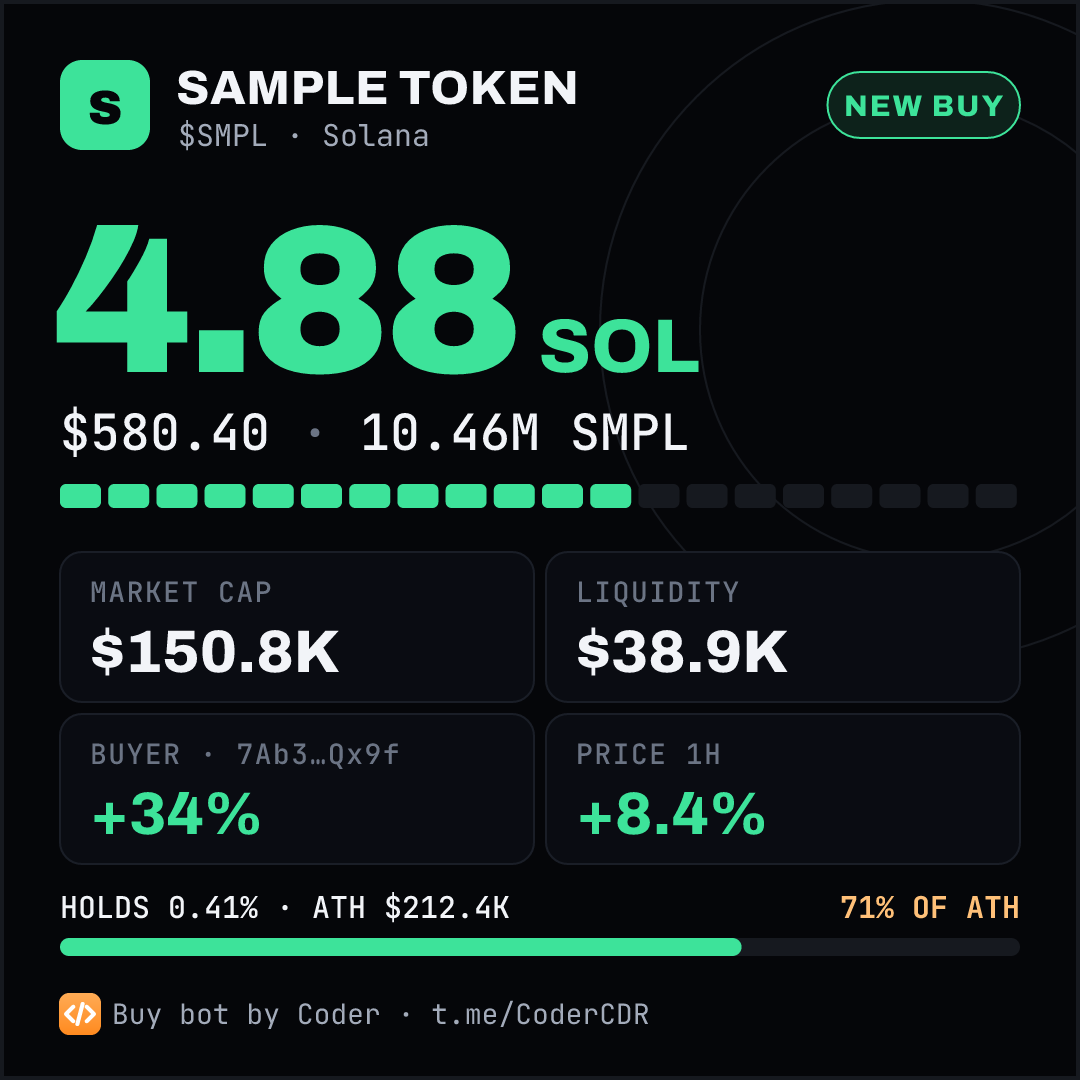
@Coder_BuyBot posts every buy of your token to your Telegram group with a live buy card: SOL spent, USD value, buyer, new holder or position growth, market cap, ATH, liquidity, 24h volume and quick-buy buttons. Free for any Solana token.
- 🔎 Every venue: the pump.fun bonding curve, PumpSwap, Raydium, Meteora, Orca and every other SOL pool DexScreener lists. A buy split across pools is counted in full.
- 🎨 Your look: emoji, card color (presets or any hex), your own GIF or image, or text only.
- 💸 Your referral codes on the Maestro, Maestro Pro and GMGN buttons. Leave them empty and Coder's are used.
- 🔇 No spam: buys only, above your minimum, never older than 10 minutes, never twice.
 ➕ Add to your group
📄 Buy Bot page
➕ Add to your group
📄 Buy Bot page
🚀 Setup (Under a Minute)
Step 1: Add the bot
Add @Coder_BuyBot to your group. It only needs permission to post messages. It greets the group with a ⚙️ Set up button.
Step 2: Send your contract address
A group admin taps ⚙️ Set up. It opens a private chat with the bot. Paste the token's contract address; the bot finds the curve and every pool by itself.
Step 3: Customise and test
Set the minimum buy, whale size, emoji, color, style, links and referral codes, then tap 🧪 Test post to see a sample in the group.
/settings
In the group or the bot's chat: opens the settings panel privately. Admins only.
/start
In the bot's chat: add the bot to a group, or open the settings of groups you added it to.
⚙️ Settings
| Setting | Options | Default |
|---|---|---|
| 🪙 Token | Any Solana token with a pump.fun curve or a SOL pool | None |
| 💰 Min buy | 0.05 to 2 SOL presets, or any amount | 0.1 SOL |
| 🐋 Whale | 1 to 50 SOL presets, or any amount. Whale buys get the gold whale card | 5 SOL |
| 😀 Emoji | 🟢 🟧 🔥 🚀 💎 🐸 ⚡ 🦍, or your own | 🟢 |
| 🎨 Color | Green, Amber, Blue, Purple, Pink, Red, Gold, Cyan, or any hex like #4DA3FF | #3DE39A |
| 🖼 Style | Buy card, your own GIF or image, or text only | Buy card |
| 🔗 Links | Your X, Telegram and website as buttons (https only) | None |
| 💸 Ref links | Your Maestro name and GMGN code, or your full referral links | Coder's codes |
| ⏸ Pause | Stop and resume posting; settings are kept | Posting |
❓ Buy Bot FAQ
Is it free?
Yes, for any token and any group. Every post ends with one short line linking to the Coder community.
One group, several tokens?
One token per group. Any number of groups can follow the same token, each with its own settings.
It stopped posting.
Check the bot is still in the group and can post, that posting is not paused, and that buys are above your minimum. If it was removed, add it again: your settings are kept.
Does it touch my wallet?
No. It reads public on-chain data and posts messages. It never asks for a wallet, a key or a payment.
🐦 X Scraper: The Fastest Twitter Monitoring on Earth
Get Twitter notifications in 4 milliseconds. Not 4 seconds. Not 4 minutes. 4 milliseconds.
Why This Matters
- 🎯 Alpha Caller Tweets: See new calls before engagement spikes, before the crowd floods in
- 💰 Project Announcements: Catch founder tweets the instant they post—not 30 seconds later when price already moved
- 🔥 Market Intelligence: Monitor competitors and influencers in real-time
- 🚀 First-Mover Edge: Speed = money. Being 4ms ahead means you act while others are still loading Twitter
How Fast Is 4 Milliseconds?
- 👁️ Human blink: 100-150ms (we're 25-37x faster)
- 📱 Twitter push notifications: 1-5 seconds (we're 250-1250x faster)
- 🔄 Manual refresh checking: Infinite delay (you have to be online and checking)
- ⚡ X Scraper: 4ms (fastest in existence)
🚀 Setup Guide (Takes 2 Minutes)
Step 1: Create Private Group
Make a new private Telegram group. Name it whatever you want. This is where your tweet notifications appear.
Step 2: Add The Bot
Add @CoderEcoX_bot to that group. That's it. No admin permissions needed.
Step 3: Link The Group
In your group, type:
/setuptwitter
Bot will confirm it's linked
Step 4: Add Twitter Accounts
DM the bot and type:
/xs
Click "➕ Add Account" and enter any Twitter handle (without the @)
Done. You're Live.
Every time that account tweets, you get it in your group with a speed metric showing delivery time. Usually 4-29ms.
📋 Commands
/xs
Opens the main menu. Add accounts, remove accounts, check your limits.
/setuptwitter
Run this IN your private group to link it for notifications. Only need to do this once.
What Tweets Look Like
🐦 @elonmusk
Going to Mars soon
🔗 View Tweet
⏰ Nov 2, 10:33 UTC
⚡ Delivered in 4ms
That last line? That's proof. 4 milliseconds from tweet to your screen.
💎 How Many Accounts Can You Monitor?
| Your Tier | Accounts | Cost |
|---|---|---|
| Free | 1 | $0 |
| CDR Holder (10M+ tokens) | 10 | FREE forever |
| PF Bot Subscriber | 10 | Already paying for PF bot |
| Twitter Unlimited | ∞ Unlimited | Contact us |
Want More Slots?
- 💎 Buy 10M+ CDR tokens = 10 slots forever
- ⚡ Subscribe to PF Bot = 10 slots included
- 📞 Contact for Unlimited = custom pricing for power users
❓ X Scraper FAQ
Q: How fast is it really?
A: 4-29 milliseconds. Every tweet notification shows the speed metric. We're not hiding anything—you can verify yourself. We're the fastest in the world.
Q: Can I monitor private accounts?
A: No. Only public Twitter accounts work.
Q: What if multiple people monitor the same account?
A: Everyone gets notified instantly. No slowdown.
Q: What happens if I go over my limit?
A: Your oldest accounts keep working. Newer accounts stop delivering until you remove old ones or upgrade.
Q: Can I change my notification group?
A: Yes. Remove bot from old group, add to new group, run /setuptwitter in new group. Done.
Q: Does this work with channels?
A: No. Private groups only.
Q: Why would I use this instead of Twitter notifications?
A: Because Twitter's notifications are 1-5 seconds delayed. Ours are 4ms. When you're trading on alpha calls, 5 seconds = price already moved. Speed = money.
Q: Can I filter tweets by keyword?
A: Not yet. Coming soon.
Q: Is this included with my PF Bot subscription?
A: Yes. All PF Bot subscribers get 10 X Scraper slots automatically. Zero extra cost.
Q: Who else offers this?
A: Nobody. We're the only ones with sub-second Twitter monitoring. Everyone else is slow.
❓ Frequently Asked Questions
How accurate are the signals?
CDR doesn't predict the future - it detects patterns that historically correlate with price increases. Win rates vary by algorithm (check /report daily). Past performance doesn't guarantee future results.
Why did I miss a signal others received?
Possible reasons:
- You're on Free tier (15 minute delay)
- You have that specific algorithm disabled (Premium users)
- 24-hour cooldown prevented duplicate alert for that token
- You had /stop enabled
Can I backtest algorithm performance?
Use /last7d or /algo [name] to see historical performance of specific algorithms.
What's the best algorithm to use?
It changes daily. Use /report to see current leaderboard, then customize with /algos (Premium).
Why only tokens <2 hours old?
Fresh launches have the most potential for explosive growth. After 2 hours, most price discovery has occurred.
Do you have a mobile app?
CDR operates through Telegram, which has mobile apps for iOS and Android. No separate app needed.
How do I cancel my subscription?
Contact support through the subscription panel. No refunds for partial months.
What blockchain is CDR on?
CDR monitors Solana tokens on pump.fun. The CDR token itself is on Solana.
Is this financial advice?
No. CDR is a tool that provides data and pattern detection. All trading decisions are yours. Crypto trading involves significant risk.
Still have questions?
Join the Telegram community or use /help in the bot for support options.